 CapaCloud blog
Stable Diffusion GPU Hosting: Performance Benchmarks and Cost Analysis

Compare Stable Diffusion GPU hosting options, benchmark popular GPUs, analyze hosting costs, and discover how to choose the right infrastructure for AI image generation workloads.
Key Takeaways
- The best GPU for Stable Diffusion depends on your workload, whether you are generating images, fine-tuning models, or serving production APIs.
- Cloud and decentralized GPU hosting platforms provide flexible alternatives to purchasing expensive local hardware.
- Cost per generated image is one of the most important metrics when evaluating Stable Diffusion infrastructure.
- GPU benchmarks should consider image resolution, batch size, model version, and workload type.
- Matching GPU resources to specific workflows can significantly reduce infrastructure costs.
Artificial intelligence image generation has moved into the mainstream, with creators, startups, and enterprises using Stable Diffusion to power content creation and AI applications.
While local hardware may be sufficient for occasional use, workloads such as batch generation, fine-tuning, and production APIs quickly outgrow consumer GPUs. As a result, many organizations are turning to GPU hosting platforms such as Capacloud to access scalable, on-demand compute without high upfront costs.
Choosing the right GPU and hosting strategy is critical. An RTX 4090 may be ideal for creators, while production workloads often require A100- or H100-class infrastructure.
This guide benchmarks popular GPUs, analyzes hosting costs, and explains how to choose the right infrastructure for Stable Diffusion workloads.
Stable Diffusion GPU Requirements by Model and Workflow
Choosing the right GPU for Stable Diffusion depends on two primary factors: the model you plan to run and the workload you need to support. A creator generating images occasionally has very different infrastructure requirements from an organization training custom models or operating a production image generation API.
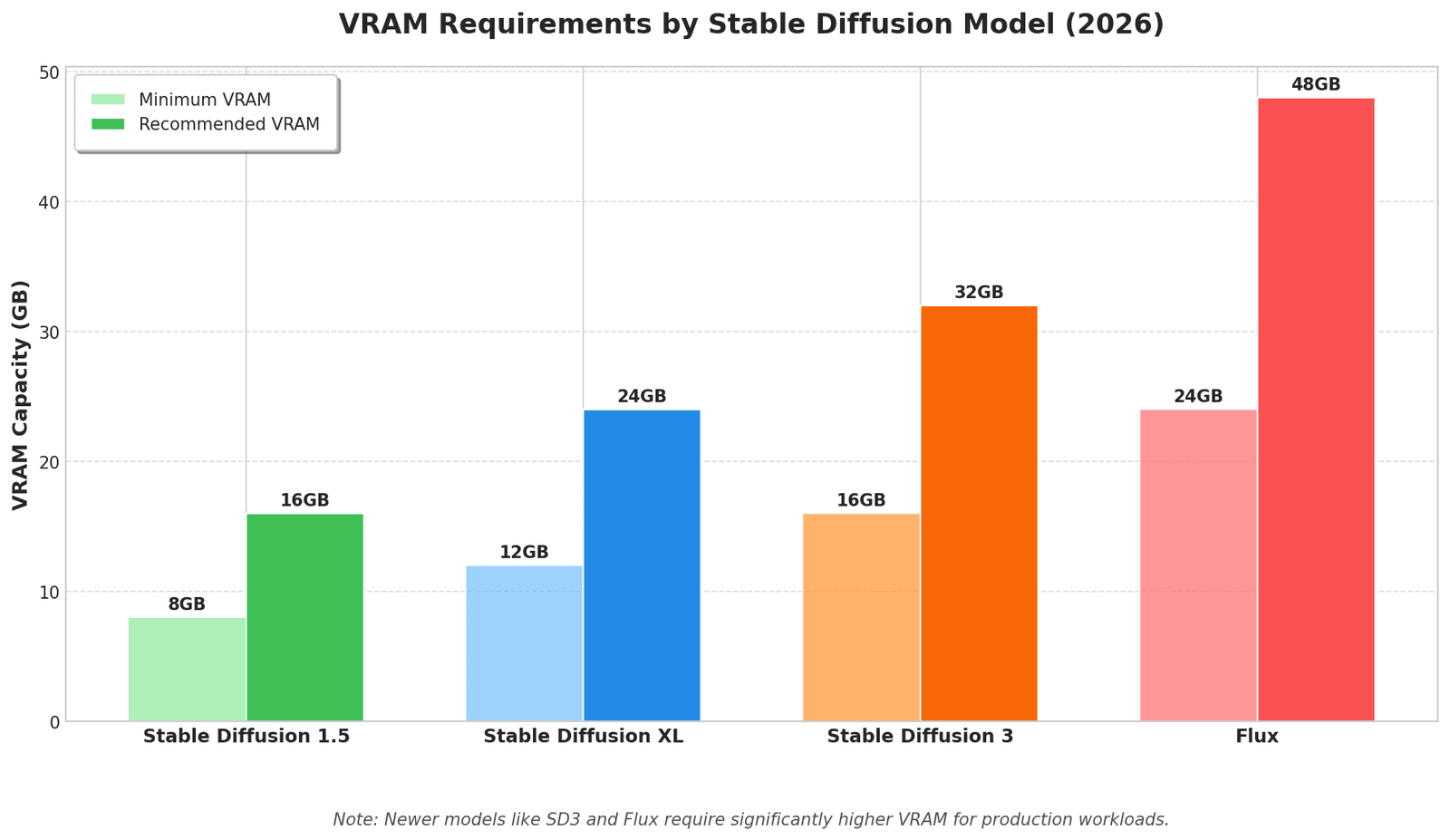
Newer models such as Stable Diffusion XL, Stable Diffusion 3, and Flux require significantly more compute resources than earlier versions. Similarly, workloads such as LoRA training, batch image generation, and API inference demand more GPU memory and processing power than basic image generation.
Understanding both model requirements and workload characteristics is essential for selecting cost-effective GPU infrastructure.
GPU Requirements by Stable Diffusion Model
Hardware requirements vary considerably across Stable Diffusion model generations.
| Model | Minimum VRAM | Recommended VRAM | Typical Use Cases |
| Stable Diffusion 1.5 | 8GB | 12GB to 16GB | Image generation, experimentation, lightweight LoRA training |
| Stable Diffusion XL (SDXL) | 12GB | 16GB to 24GB | Commercial image generation, batch processing |
| Stable Diffusion 3 | 16GB | 24GB+ | Production inference, advanced image generation |
| Flux | 24GB | 48GB+ | Enterprise workloads, large-scale image generation |
Stable Diffusion 1.5
Stable Diffusion 1.5 remains one of the most accessible image generation models. Most basic image generation tasks can run on GPUs with 8GB to 12GB of VRAM, making it suitable for hobbyists, creators, and developers experimenting with AI image generation.
Stable Diffusion XL
SDXL delivers significantly improved image quality and prompt adherence but requires more memory and compute resources. GPUs with 16GB to 24GB of VRAM are typically recommended, especially for high-resolution image generation and batch workloads.
Stable Diffusion 3
Stable Diffusion 3 introduces more advanced capabilities and generally benefits from GPUs with at least 24GB of VRAM for production deployments. Organizations serving multiple users or generating images at scale often rely on hosted GPU infrastructure for these workloads.
Flux Models
Flux models are among the most demanding image generation models currently available. Many deployments benefit from GPUs with 48GB or more of VRAM, particularly when supporting concurrent users, large batch sizes, or high-resolution outputs.
Organizations frequently use hosted GPU platforms such as Capacloud to access high-memory GPUs on demand rather than investing in expensive dedicated hardware.
GPU Requirements by Workflow
Infrastructure requirements vary depending on how Stable Diffusion is used. The table below outlines recommended GPU configurations for common workloads.
| Workflow | Recommended VRAM | Typical GPU |
| Single image generation | 12GB to 24GB | RTX 3090, RTX 4090 |
| Batch image generation | 24GB to 48GB | RTX 4090, L40S |
| LoRA training | 24GB to 40GB+ | RTX 4090, A100 |
| DreamBooth fine-tuning | 40GB+ | A100, H100 |
| API-based inference | 24GB to 80GB+ | L40S, A100 |
| Commercial image generation platforms | 40GB to 80GB+ | A100, H100 |
Individual creators and hobbyists can typically rely on consumer GPUs such as the RTX 3090 or RTX 4090 for image generation and experimentation. Larger workloads, including batch processing, LoRA training, and DreamBooth fine-tuning, benefit from GPUs with greater memory capacity and compute performance.
Organizations deploying production APIs or commercial image generation platforms should prioritize scalable infrastructure with autoscaling, high availability, and support for concurrent users. Hosted and distributed GPU platforms are often the preferred choice for these workloads.
Key Factors to Consider When Choosing Stable Diffusion GPU Hosting
Choosing the right Stable Diffusion hosting provider involves more than comparing hourly GPU prices. The ideal platform should align with your workload requirements, performance expectations, and growth plans.
GPU Type and Performance
The GPU is the most important factor affecting Stable Diffusion performance. Consumer GPUs such as the RTX 4090 offer excellent price-to-performance for creators and small teams, while enterprise GPUs such as the A100 and H100 are better suited for large-scale training and production workloads.
| GPU | Typical VRAM | Best For |
| RTX 3090 | 24GB | Hobby projects, LoRA training |
| RTX 4090 | 24GB | Image generation, batch processing |
| NVIDIA L40S | 48GB | Production inference |
| NVIDIA A100 | 40GB to 80GB | Large-scale training |
| NVIDIA H100 | 80GB+ | Enterprise AI workloads |
Scalability and Concurrency
Scalability becomes increasingly important as Stable Diffusion workloads grow. While individual creators may prioritize low latency for interactive image generation, organizations serving APIs or commercial applications must also consider throughput and the number of concurrent users their infrastructure can support.
Production workloads often experience fluctuating demand. A hosting platform should be able to automatically scale GPU resources during traffic spikes while maintaining consistent response times. Features such as autoscaling, workload scheduling, and queue management can help prevent performance bottlenecks during periods of high usage.
Teams building image generation APIs or multi-user applications should prioritize providers that support concurrent workloads and elastic scaling. Platforms such as Capacloud allow organizations to provision additional GPU resources on demand, making it easier to maintain performance as user demand increases.
VRAM Capacity
VRAM determines the image resolution, batch size, and model complexity a GPU can support.
As a general guideline:
- 8GB to 12GB: Stable Diffusion 1.5 workloads.
- 16GB to 24GB: SDXL and advanced image generation.
- 40GB+: Large-scale training and enterprise deployments.
Organizations planning future growth should avoid choosing GPUs that only meet minimum requirements.
Storage and Provisioning
Fast SSD or NVMe storage improves checkpoint loading and training performance. Provisioning speed is equally important, especially for burst workloads, experimentation, and temporary training jobs.
Geographic Availability
Organizations serving global users should prioritize providers with geographically distributed infrastructure to reduce latency and improve reliability. Platforms such as Capacloud provide access to globally distributed GPU resources, enabling teams to deploy workloads closer to users.
Pricing Model
Most GPU hosting providers offer one or more of the following pricing options:
- On-demand: Ideal for experimentation and variable workloads.
- Reserved instances: Lower pricing for predictable, long-running workloads.
- Spot instances: Discounted pricing for interruptible workloads.
- Pay-as-you-go: Flexible pricing without long-term commitments.
For many Stable Diffusion users, pay-as-you-go infrastructure offers the best balance between cost efficiency and scalability. Platforms such as Capacloud allow organizations to provision GPU resources only when needed, helping reduce infrastructure waste and unnecessary spending.
Stable Diffusion GPU Benchmarks
Performance benchmarks provide one of the most effective ways to evaluate GPU hosting options.
Raw specifications such as CUDA core counts and VRAM capacity tell only part of the story. Actual image generation performance depends on many factors, including model architecture, resolution, batch size, optimization settings, and workload type.
Benchmarking helps organizations answer critical questions such as:
- Which GPU generates images fastest?
- Which GPU offers the best cost-to-performance ratio?
- How does image resolution affect throughput?
- At what point do premium GPUs deliver diminishing returns?
To ensure meaningful comparisons, benchmark methodology must be transparent and repeatable.
Performance Benchmarks by GPU
Benchmarking GPU performance is essential when evaluating Stable Diffusion hosting options. While premium GPUs generally deliver faster image generation, they do not always provide the best value for every workload.
For many organizations, the goal is not simply to generate images as quickly as possible. Instead, the objective is to achieve the best balance between performance, cost, and scalability.
The benchmark results below illustrate how popular GPUs perform when running Stable Diffusion XL under a standardized testing environment.
Benchmark assumptions:
- Model: Stable Diffusion XL Base
- Resolution: 1024×1024
- Sampler: DPM++ 2M Karras
- Steps: 30
- Batch Size: 1
- Precision: FP16
- xFormers enabled
| GPU | VRAM | Images per Minute | Average Generation Time | Best Use Case |
| RTX 3090 | 24GB | 18 to 22 | 2.7 to 3.3 seconds | Individual creators, experimentation |
| RTX 4090 | 24GB | 24 to 30 | 2.0 to 2.5 seconds | Batch generation, content creation |
| NVIDIA L40S | 48GB | 30 to 36 | 1.7 to 2.0 seconds | Production inference, enterprise workloads |
| NVIDIA A100 80GB | 80GB | 32 to 38 | 1.6 to 1.9 seconds | Fine-tuning, large-scale inference |
| NVIDIA H100 | 80GB+ | 40 to 50 | 1.2 to 1.5 seconds | High-throughput production environments |
These results demonstrate that consumer GPUs such as the RTX 4090 remain highly competitive for many Stable Diffusion workloads. For creators, agencies, and startups, the RTX 4090 often delivers the best price-to-performance ratio.
Enterprise GPUs such as the A100 and H100 provide substantial throughput improvements, particularly when serving multiple concurrent users or running large-scale inference pipelines. However, the performance gains may not justify the additional cost for smaller deployments.
Stable Diffusion Performance by Image Resolution
Image resolution has a direct impact on GPU performance. As resolution increases, VRAM consumption rises significantly and image generation times increase.
Organizations generating marketing assets, print-quality images, or high-resolution artwork should carefully evaluate GPU capabilities before selecting a hosting platform.
The table below illustrates how generation speed changes as image resolution increases.
| GPU | 512×512 | 1024×1024 | 2048×2048 |
| RTX 3090 | 45 to 55 images/min | 18 to 22 images/min | 4 to 6 images/min |
| RTX 4090 | 55 to 70 images/min | 24 to 30 images/min | 6 to 8 images/min |
| NVIDIA L40S | 65 to 80 images/min | 30 to 36 images/min | 8 to 10 images/min |
| NVIDIA A100 80GB | 70 to 85 images/min | 32 to 38 images/min | 9 to 12 images/min |
| NVIDIA H100 | 85 to 100 images/min | 40 to 50 images/min | 12 to 15 images/min |
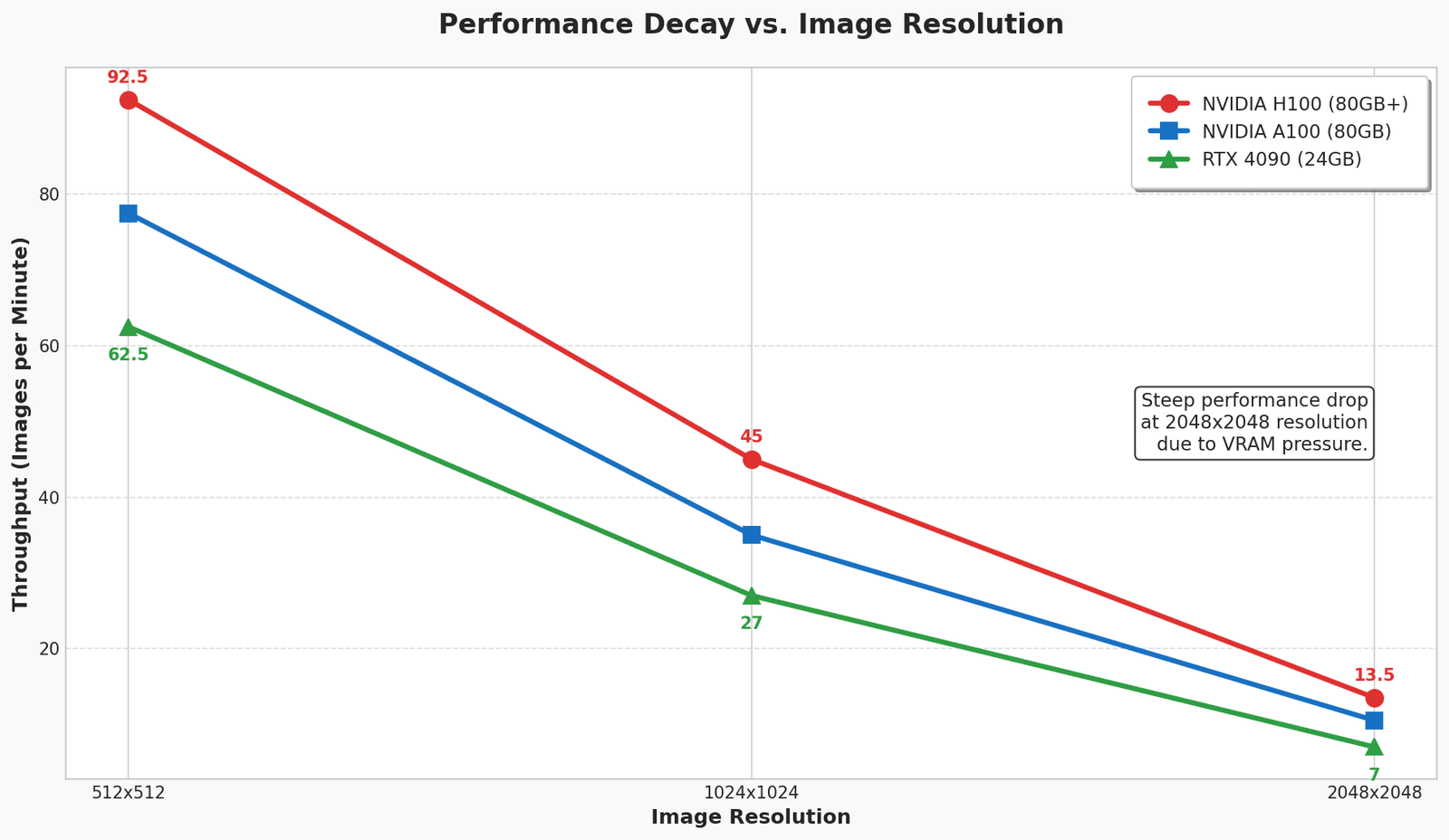
For workloads involving 2048×2048 image generation, GPUs with larger VRAM capacities such as the L40S, A100, and H100 are generally recommended. These accelerators provide additional memory headroom and maintain more consistent performance under demanding workloads.
Benchmark Results Analysis
Several important insights emerge from these benchmark results.
Consumer GPUs Still Deliver Exceptional Value
For many Stable Diffusion users, consumer GPUs remain the most cost-effective option.
The RTX 4090, in particular, offers excellent performance across a wide range of image generation workloads. It is often capable of supporting SDXL image generation, LoRA training, and moderate batch processing without requiring enterprise-class infrastructure.
For individual creators, agencies, and smaller AI startups, hosted RTX 4090 instances frequently provide the optimal balance between cost and performance.
Enterprise GPUs Excel at Scale
Enterprise accelerators such as the NVIDIA A100 and H100 become increasingly valuable as workload complexity grows.
These GPUs are particularly beneficial for:
- Large-scale batch generation.
- Multi-user inference services.
- Fine-tuning and model training.
- Production APIs with strict latency requirements.
- Commercial image generation platforms.
Organizations expecting sustained growth often benefit from access to these higher-end GPUs through hosted infrastructure providers rather than purchasing dedicated hardware.
Platforms such as Capacloud enable organizations to provision high-memory GPUs on demand, allowing teams to access enterprise-class infrastructure only when workloads require it.
Diminishing Returns Are Real
Although the H100 delivers the highest throughput, the performance improvement is not always proportional to its cost.
For example, an H100 may generate images roughly 40 to 60 percent faster than an RTX 4090, yet hourly hosting costs can be several times higher.
As a result, organizations should evaluate infrastructure based on cost per image rather than raw performance alone.
Workload Requirements Should Drive GPU Selection
The fastest GPU is not always the right GPU.
Organizations should select infrastructure based on:
- Expected image volume.
- Concurrent users.
- Image resolution requirements.
- Fine-tuning needs.
- Budget constraints.
- Scalability requirements.
Carefully matching infrastructure to workload characteristics can significantly reduce Stable Diffusion hosting costs while maintaining strong performance.
FAQs
What is the best GPU for Stable Diffusion hosting?+
The best GPU for Stable Diffusion hosting depends on your workload. The RTX 4090 offers excellent price-to-performance for creators and small teams, while enterprise GPUs such as the NVIDIA A100 and H100 are better suited for large-scale inference, fine-tuning, and production deployments.
How much VRAM does Stable Diffusion require?+
Stable Diffusion 1.5 can run on GPUs with as little as 8GB of VRAM, while SDXL typically requires at least 12GB to 16GB. More demanding models such as Stable Diffusion 3 and Flux often perform best on GPUs with 24GB or more of VRAM.
Is cloud GPU hosting better than running Stable Diffusion locally?+
Cloud GPU hosting is often a better option for users who need scalability, flexible access to high-performance GPUs, or support for large training and inference workloads. Running Stable Diffusion locally can be cost-effective for hobbyists and users with predictable workloads.
How much does Stable Diffusion GPU hosting cost?+
Stable Diffusion GPU hosting costs vary based on the GPU type, provider, and workload. Consumer GPUs such as the RTX 4090 may cost less than $1 per hour, while enterprise GPUs such as the A100 and H100 can cost several dollars per hour. Actual costs depend on image volume, resolution, and usage patterns.
Can decentralized GPU platforms run Stable Diffusion workloads?+
Yes. Decentralized GPU platforms such as Capacloud can support Stable Diffusion workloads, including image generation, LoRA training, and batch inference. These platforms provide flexible, pay-as-you-go access to GPU resources without requiring long-term infrastructure commitments.
Final Thoughts on Stable Diffusion GPU Hosting
Choosing the right Stable Diffusion GPU hosting solution depends on your workload, performance requirements, and budget. While consumer GPUs such as the RTX 4090 offer excellent value for creators and startups, enterprise GPUs like the A100 and H100 are better suited for large-scale inference and training workloads.
When evaluating infrastructure, organizations should look beyond hourly pricing and consider metrics such as cost per image and GPU utilization. Flexible, on-demand GPU platforms such as Capacloud can help teams scale Stable Diffusion workloads cost-effectively without significant upfront investment.
Organizations that adopt scalable, cost-efficient GPU hosting strategies will be better positioned to support increasingly advanced AI image-generation workloads.